Currently Empty: USD$0.00
Home » SQL Courses » SQL for Cybersecurity & Log Analytics
⭐ Popular
SQL for Cybersecurity & Log Analytics
Use SQL to investigate security events, detect suspicious patterns and analyze logs across users, devices, networks and cloud environments.
3 course parts · 8 cybersecurity tables · 3 capstone projects · AI Tutor · Certificate issued by CiAI.
Original price was: USD$50.00.USD$15.99Current price is: USD$15.99. /month
Self-paced online · Practical cybersecurity SQL using realistic security log datasets.
Complete enrollment through DataSoSi checkout. Payment options depend on checkout configuration.
Investigate Realistic Security Logs
Work with authentication, Windows, network, endpoint, Linux and cloud activity records modeled on common security operations data.
Detect Suspicious Patterns with SQL
Identify repeated failed logins, blocked connections, high-severity endpoint events and unusual user or device activity.
Connect Multiple Security Sources
Join users, assets and logs to build a fuller view of who acted, which device was involved and what happened.
3 Applied Capstone Projects
Complete one security-focused capstone after each part, progressing from log foundations to investigation and decision support.
Turn Security Logs into Investigative Insight with SQL
Security teams work with large volumes of activity records generated by users, devices, authentication systems, endpoints, networks, operating systems and cloud services. This course teaches learners how SQL can be used to filter, summarize and connect those logs so suspicious activity can be investigated more efficiently.
What questions will you learn to investigate?
You will use SQL to answer practical security questions such as: Which users have repeated failed logins? Which devices generated high-severity endpoint alerts? Which network connections were blocked? What Windows or Linux activity deserves review? Which cloud actions were successful or unusual? Which patterns should be escalated for further investigation?
users & assetsidentity · devices · ownership · criticality
authentication & OS logslogins · Windows events · Linux activity
network & endpoint logsconnections · ports · processes · threats
cloud activityproviders · APIs · resources · actions
What you will learn
- Understand how cybersecurity data is organized across users, assets and security logs
- Explore authentication, Windows, network, endpoint, Linux and cloud activity tables
- Write SELECT queries for security records
- Filter suspicious security events with WHERE
- Sort and limit log results for faster investigation
- Count and summarize security events
- Join users, assets and security logs using shared identifiers
- Aggregate security metrics with GROUP BY
- Filter grouped security patterns with HAVING
- Analyze authentication and access activity
- Investigate endpoint alerts, malware indicators and processes
- Analyze network connections, protocols and blocked activity
- Review Windows, Linux and cloud security activity
- Detect repeated or abnormal behavior across security logs
- Build incident-focused reports to support security decisions
Who this course is for
- Security analysts and aspiring security analysts
- SOC analysts and SOC-focused learners
- Cybersecurity analysts
- Threat hunters and detection analysts
- Cloud security analysts
- Professionals who want practical SQL skills for security investigations and log analytics
SQL for Cybersecurity & Log Analytics: 3-Part Curriculum
The curriculum follows the uploaded course materials: cybersecurity log foundations, intermediate log analysis, and advanced cybersecurity investigation and decision-making.
Learn how security logs are structured and write foundational SQL queries for cybersecurity data.
- Understanding Cybersecurity Data Tables
- Users, Assets, and Authentication Logs Overview
- Writing Your First SQL Queries for Security Data
- Filtering Security Logs with WHERE
- Sorting and Limiting Log Results
- Counting and Summarizing Security Events
- Capstone 1: Security Log Foundations & Event Summary Report
Connect security tables and analyze patterns across users, assets, authentication, endpoints, networks and operating systems.
- Joining Security Tables: Users, Assets, and Logs
- Aggregating Security Metrics with GROUP BY
- Filtering Aggregated Security Results with HAVING
- Authentication and Access Analysis
- Endpoint and Network Event Analysis
- Windows, Linux, and Cloud Activity Analysis
- Capstone 2: Multi-Source Security Activity Analysis
Use SQL to detect suspicious patterns, investigate threats and create security reporting that supports decisions.
- Threat Detection and Suspicious Activity Identification
- User Behavior and Access Pattern Analysis
- Endpoint Threat and Malware Investigation
- Network Threat Analysis and Intrusion Detection
- Cloud Security and Privileged Activity Monitoring
- Incident Reporting and Security Decision Support
- Capstone 3: Cybersecurity Investigation & Incident Decision Report
Follow the Cybersecurity Investigation Workflow End to End
1. Explore the LogsUsers, assets, authentication, endpoint, network, operating-system and cloud records.
→
2. Find Security PatternsFilter, join, group and compare events across multiple log sources.
→
3. Support InvestigationIdentify suspicious behavior, prioritize activity and create incident-focused reporting.
Part 3 · Threat Detection
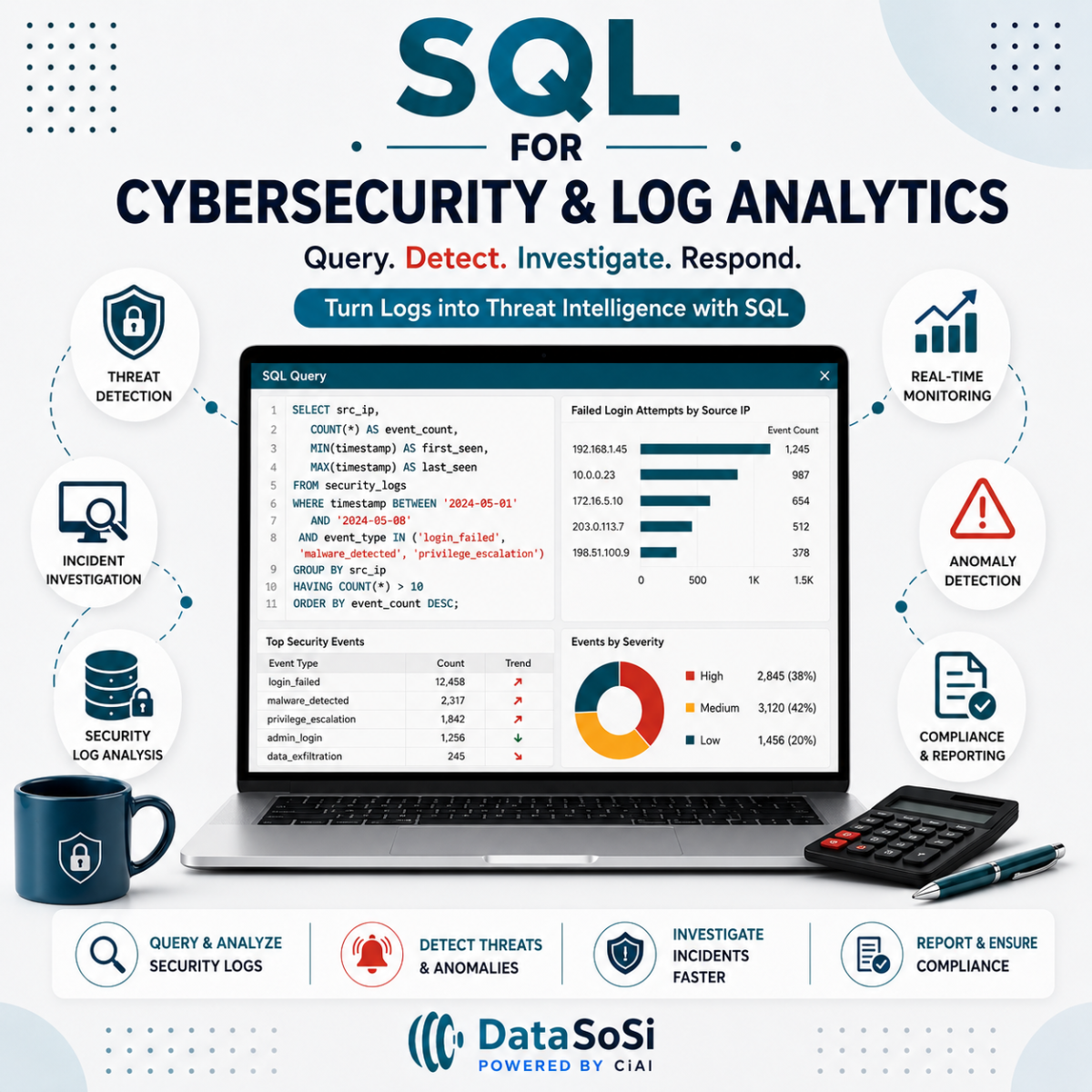
Example: identify source IPs with repeated failed logins
Repeated authentication failures from the same source can be a useful pattern for an analyst to investigate.
SELECT
src_ip,
COUNT(*) AS failed_attempts
FROM auth_logs
WHERE logon_status = 'Failed'
GROUP BY src_ip
HAVING COUNT(*) > 2;
-- Highlights source IPs with more than two failed login attempts.
The course extends this approach into endpoint threats, network activity, Windows and Linux events, cloud activity, user behavior and incident reporting.
3 Hands-On SQL Cybersecurity Capstone Projects
The course includes exactly 3 capstone projects — one after each course part — so learners progress from basic log exploration to multi-source security analysis and advanced investigation.
Capstone 1
Security Log Foundations & Event Summary Report
Explore the eight security tables, filter security activity, sort important records and summarize key event counts across core log sources.
Skills: SELECT, WHERE, ORDER BY, LIMIT, COUNT and security-log interpretation.
Capstone 2
Multi-Source Security Activity Analysis
Join users, assets and logs to analyze authentication behavior, endpoint activity, network events and Windows, Linux and cloud patterns.
Skills: JOINs, GROUP BY, HAVING, access analysis and cross-source security reporting.
Capstone 3
Cybersecurity Investigation & Incident Decision Report
Investigate repeated failed logins, suspicious network activity, endpoint threats, user behavior and cloud actions, then summarize findings for security decision support.
Skills: threat detection, behavior analysis, endpoint investigation, network analysis, cloud monitoring and incident reporting.
Recommended Next SQL Courses
After completing SQL for Cybersecurity & Log Analytics, continue with deeper SQL and analytical courses that strengthen investigation, query logic and AI-assisted analysis.
Next 1
SQL Intermediate
Strengthen query logic with subqueries, CTEs, advanced filtering and data cleaning.
Explore SQL Intermediate →Next 2
SQL Advance
Develop advanced set logic, window functions, performance and BI-ready SQL.
Explore SQL Advance →Next 3
SQL AI-Assisted
Learn to generate, inspect, debug and verify SQL with AI while maintaining human judgment.
Explore SQL AI-Assisted →Next 4
SQL Data Analytics
Expand into business intelligence, data engineering and machine-learning preparation.
Explore SQL Data Analytics →Course Details
Format100% self-paced, online
LevelBeginner to applied cybersecurity SQL
Structure3 course parts
Security database8 connected cybersecurity tables
Core tablesusers, assets, auth_logs, windows_event_logs, network_events, edr_logs, linux_syslogs, cloud_activity_logs
PracticeHands-on SQL using realistic cybersecurity log data
Career relevanceSecurity Analyst, SOC Analyst, Cybersecurity Analyst, Threat Hunter, Detection Analyst, Cloud Security Analyst
AI TutorIncluded — cybersecurity-log-specific SQL guidance
Capstone ProjectsExactly 3 — one after each course part
CertificateIssued by the Canadian Institute of Artificial Intelligence (CiAI)
Frequently Asked Questions
This course is designed for learners who want practical SQL skills for cybersecurity investigations, security operations, log analytics and threat detection.
The course includes exactly 3 capstone projects: 1) Security Log Foundations & Event Summary Report, 2) Multi-Source Security Activity Analysis, and 3) Cybersecurity Investigation & Incident Decision Report.
The certificate of completion is issued by the Canadian Institute of Artificial Intelligence (CiAI).
The course uses 8 core tables: users, assets, auth_logs, windows_event_logs, network_events, edr_logs, linux_syslogs and cloud_activity_logs.
Part 1 covers cybersecurity data tables, users/assets/authentication logs, first SQL queries, WHERE filtering, sorting, limiting, counting and summarizing security events.
Part 2 covers joins across users, assets and logs, GROUP BY, HAVING, authentication and access analysis, endpoint and network event analysis, and Windows, Linux and cloud activity analysis.
Part 3 covers threat detection, suspicious activity, user behavior, endpoint malware investigation, network threat analysis, cloud security, privileged activity monitoring, incident reporting and security decision support.
Yes. The course uses auth_logs to analyze login status, authentication methods, event types, source IPs and repeated failed-login patterns.
Yes. The edr_logs table includes process_name, file_hash, threat_name, action_taken and severity for endpoint threat investigation.
Yes. Learners analyze source and destination IPs, ports, protocols, allowed or blocked activity and alert types in network_events.
Yes. Learners analyze Windows event categories and IDs as well as Linux processes, commands, messages and severity.
Yes. cloud_activity_logs includes provider, service, API call, resource, region and action status fields used for cloud activity and privileged-action analysis.
The source materials connect the course to Security Analyst, SOC Analyst, Cybersecurity Analyst, Threat Hunter, Detection Analyst and Cloud Security Analyst roles.
Recommended next courses include SQL Intermediate, SQL Advance, SQL AI-Assisted and SQL Data Analytics.
For current subscription, cancellation and refund information, visit the DataSoSi FAQ page or Contact Us.
Meet the Creator of the Course
Learn from an educator and machine learning engineer working across analytics, AI, data science and applied business problems.

Dr. Mark Lokanan
Professor · Senior Machine Learning Engineer · Data Scientist · AI Specialist
Dr. Mark Lokanan is a professor at Royal Roads University and a Senior Machine Learning Engineer at Vedia. His work spans data science, machine learning, artificial intelligence, analytics, financial crime, and applied research. Drawing on both academic and industry experience, he designed SQL for Cybersecurity & Log Analytics to help learners use SQL to investigate security logs, identify suspicious patterns, analyze access and endpoint activity, and support evidence-based security decisions.
SQL Cybersecurity Course Assistant
Ask me about the 3 course parts, 3 capstones, the 8 security tables, authentication logs, endpoint alerts, network activity, Windows events, Linux syslogs, cloud activity, threat detection, the CiAI certificate, or recommended next courses.